
A Shopify app by Matrix Health Group
Matrix Bundles — Build-your-own bundles for Shopify
Matrix Bundles is a Shopify app for mix-and-match bundles. Customers pick products from your collections, and the bundle becomes one discounted line in the cart and at checkout.
Your order still records every product separately, so refunds, picking and reporting keep working exactly as they did. Bundle prices use none of your store’s 25 automatic-discount slots.
Matrix Bundles is live on the Shopify App Store. Free for one live bundle. $19 a month for Core, or $29 a month for Core + Discounts, each with a 14-day free trial. View it on the Shopify App Store
One line for the shopper. Every product on the order.
Most bundling works by creating a bundle product in your catalogue and selling that. That is what breaks refunds and stock counts, because the thing the customer bought is not a thing you actually sell. This app creates no such product. It merges the lines the shopper already chose, so your order still lists each product individually — the only thing it adds is one hidden helper product, carrying the merged line’s title and price.
Figures are illustrative, to show how the mechanism behaves.
How the rules work
-
Point each step at a collection
A bundle is built from a collection you already keep. You say how many items a step needs and which collection they come from. Nothing is written to your products, and anything you add to that collection later joins the bundle on its own — no editing the bundle, no tagging. A step can point at a product tag instead, but the builder on your shop cannot draw a tag step, so use tags only for bundles customers never build on the page.
-
Set the minimums and the discount
Each step has a minimum — or can be made optional — and the bundle has a minimum overall. Pricing is a percentage off the qualifying lines, and a bundle can come with up to three free gifts that cost the shopper nothing. You can also leave a collection or a tag out, so those products never count towards a bundle and never get the saving.
-
Check it before it goes live
Each bundle’s screen has a panel headed What checkout will do. It builds a cart from your own products, runs it against the rules you last saved, and shows what checkout would do with it — including why a cart would not qualify. Bundles stay in draft until you set them live.
-
The price is worked out by Shopify
The price and the merge are worked out by Shopify, not by your theme, so they hold even on checkout routes that never run your theme. Bundle prices use none of your store’s 25 automatic-discount slots, because each is a price adjustment rather than a discount. Discount rules are different: all of them together use one.
What it does not do
Worth knowing before you install anything, and rarely published. Some of these are limits of the platform and cannot change; others are simply not built yet.
- Bundles and subscriptions cannot be combined
- A platform rule, not our choice. Shopify refuses to merge lines that carry a selling plan, so a subscription item will not join a bundle. No app can work around this.
- An order cannot be edited into a bundle afterwards
- Also a platform rule. The pricing runs at checkout, so support cannot add an item to a bundle once the order exists.
- No maximums, and no “three different products” rule
- A step has a minimum, or can be optional, but never a maximum — and nothing requires the items to be different. If one product satisfies every step a bundle has, three of that product will qualify. Worth checking your collections and tags against.
- Percentage savings
- A bundle saves a percentage off the qualifying items, and depending on which builder your shop is on that percentage can grow as the bundle grows. On the new builder it can also come with free gifts. What it will not do: a set bundle price, an amount off in pounds, buy-one-get-one or free shipping. A free gift comes with a complete bundle, never with spending over an amount.
- Collections and tags
- A step points at a collection or at a product tag. Product types and vendors are not supported as rules. Use a collection for anything customers build themselves: a bundle with a step on a tag still gives its discount at checkout, but no builder can draw it, so the page shows an empty space where the builder should be.
- Discount codes stack on top
- Because the bundle price is an adjustment rather than a discount, a store-wide code can still apply over it. Plan your codes with that in mind.
- No scheduling and no reporting yet
- Bundles are set live or held in draft by hand, and the app shows no performance figures — it measures nothing, so it will not claim anything.
- The storefront builder draws collection steps only
- The app ships a builder you add to your theme in Shopify’s own theme editor, and it draws steps that point at a collection. Give a bundle a step that points at a tag and the builder draws nothing at all for that bundle — an empty space on the page, on every shop — though the discount still applies at checkout. The reason it works that way: scanning a whole catalogue in a theme is slow and silently stops early, which would show a shopper part of your range with no sign that anything was missing.
Who it is for
-
Stores selling sets and kits
Where a group of products is normally bought together and you would rather sell it as one thing, without creating a separate product to maintain.
-
Stores where stock accuracy matters
Because the order records real products rather than a bundle SKU, stock, picking and per-product reporting behave normally.
-
Stores not on Shopify Plus
The merge has been proved working on a store on a standard plan, not only on Plus.
Make it look like your shop
How it looks, in the app, sets the builder’s colours, corners and spacing. On the new builder it also has seven ready-made looks to start from, fonts, and a live preview of your changes.
The new builder shows exact prices: three items that cost £52.97 together, at 15% off, show as £45.02, the penny Shopify charges. Where the last penny could come out differently, such as for a shopper paying in another currency, it shows an estimate and says the cart shows the final price.
What customers read holds every word a shopper sees in the new builder, in each language your shop sells in, so you can change the wording and translate it.
-
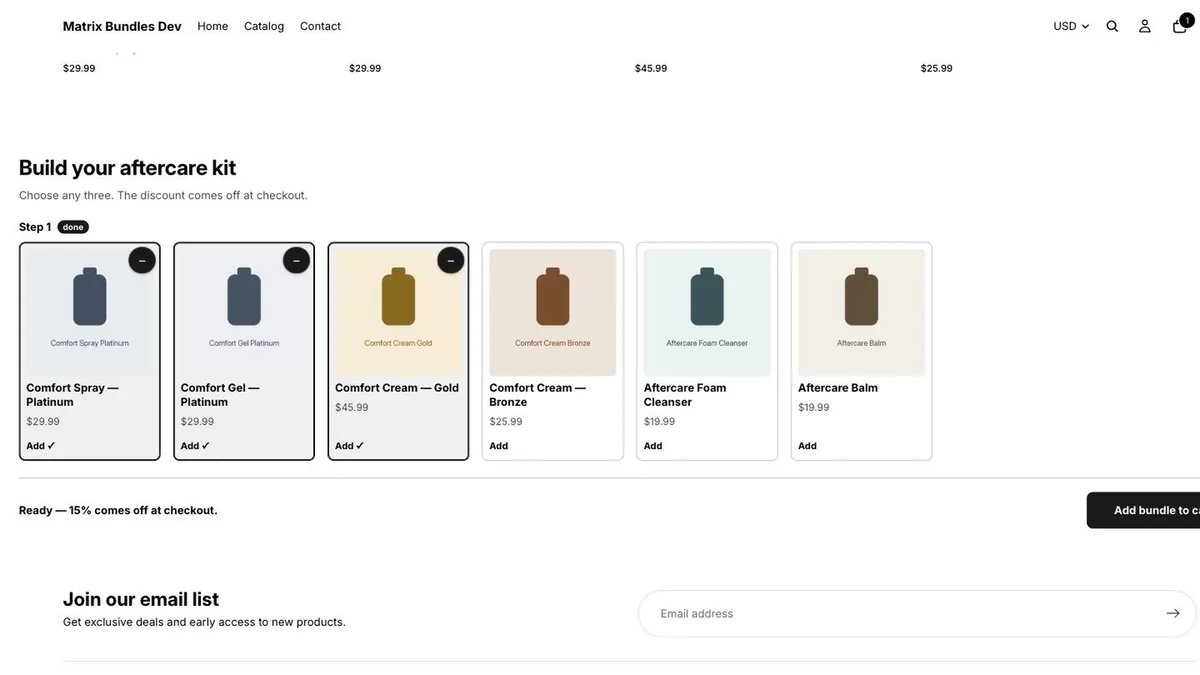
The builder on a product page. The shopper picks from your collection, and it says when the bundle is ready. -
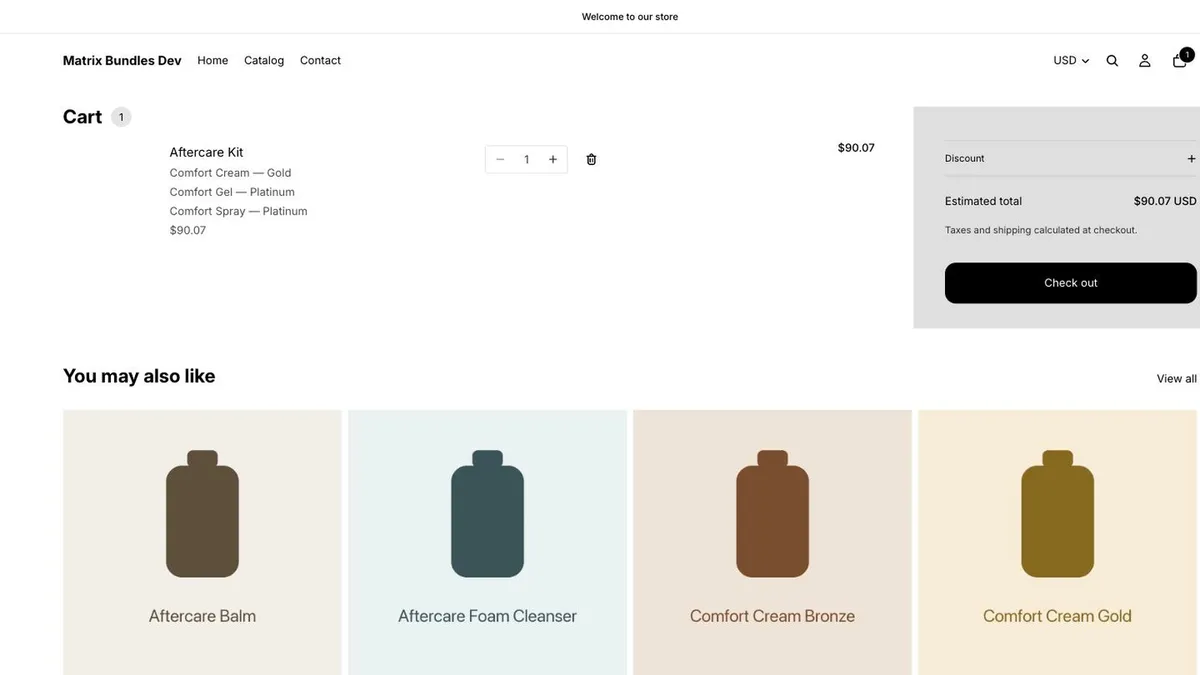
The cart. The three products arrive as one line with the bundle’s name and the discounted price. - Pictures from our test shop, on the current builder, the older of the two. A shop that installs now starts on the new builder, which looks different.
Documentation, privacy, support and company details
- Documentation
- How to install it and build a bundle The manual: installing the app, making a bundle, putting the builder on your storefront, what happens at checkout, and what to check when something is not drawing.
- Connect an assistant
- The API and the assistant connector The API and the assistant connector are switched on. Claude and ChatGPT connect by signing in, and the merchant approves them inside their own Shopify admin. Anything else uses a key the merchant makes on the app’s Access keys screen. The page says what each call does, and how to make a key.
- What’s new
-
- 28 September 2026 Exact prices are now the default on the new builder, including on shops that showed estimates before. An estimate is never rounded to a whole amount. To show estimates, choose Show estimates instead on How it looks.
- 28 September 2026 Free gifts: a bundle can come with up to three free products, inside the same one line, on the new builder.
- 25 September 2026 Discount rules, on the Core + Discounts plan: a percentage off products with a tag or in a collection, with a limit on the most off any one item.
- 25 September 2026 Access keys: make a key in the app to connect an assistant or your own program to your bundles.
- 23 September 2026 Show exact prices on the new builder: the penny a shopper will pay, instead of a rounded figure.
- 16 September 2026 Savings that grow as the bundle grows, and steps a shopper can skip, on the new builder.
- 9 September 2026 Live on the Shopify App Store.
- Privacy
- Matrix Bundles privacy policy The app requests no customer permissions and never reads customer data. It sets no cookies on your shoppers.
- Support
- Support and common questions Answers to the questions that come up most, including where the app behaves differently from what you would expect. If yours is not there, email support@matrixhealthgroup.co.uk — a monitored mailbox, read by the people who build the app.
- Company
-
Matrix Health Group Ltd
Registered in England and Wales, company number 17099304
VAT registration number GB 523 7816 82
Paddock Business Centre, 2 Paddock Road, Skelmersdale, Lancashire, WN8 9PL